

Introduction
Model binding in MVC maps HTTP request data to the parameters of the controller's action method. The parameter may either be of simple type like integers, strings, double etc. or complex types.
When we look into the request life cycle of MVC, the request is first received by the routing and from the URL, MVC identifies the Controller and action method, using routing. Routing binds the values from HTTP request to action's parameter, using model binder.
MVC binds the request data to the action parameter by parameter name. MVC will bind the action parameter from the various parts of the request. Following are the data sources in the order, which model binding looks through.
- Form values - These are the form data, which go with HTTP request, using POST method.
- Route values - The set of route values provided by MVC routing.
- Query strings - The query string data, part of the URL.
All the values from Form values, route data, and query strings are stored as the name-value pairs. The Model binding starts looking from "Form values" and it finds the parameter values by the parameter name. First, model binding looks into the form values. If it does not find any matching value, it moves on the route value for that parameter name. If it finds the matching binding, Model binding looks for other parameter.
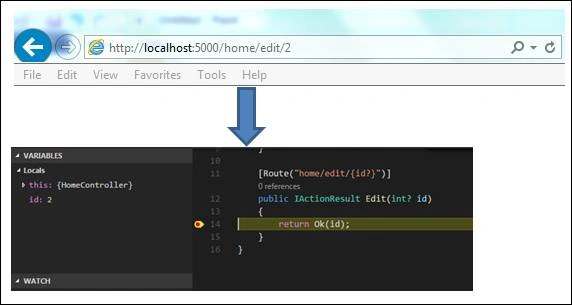
For example, consider the URL, given below-
http://theexample.com/example/edit/2
The code for the action method looks, as given below-
- [Route("home/edit/{id?}")]
- public IActionResult Edit(int? id)
- {
- }
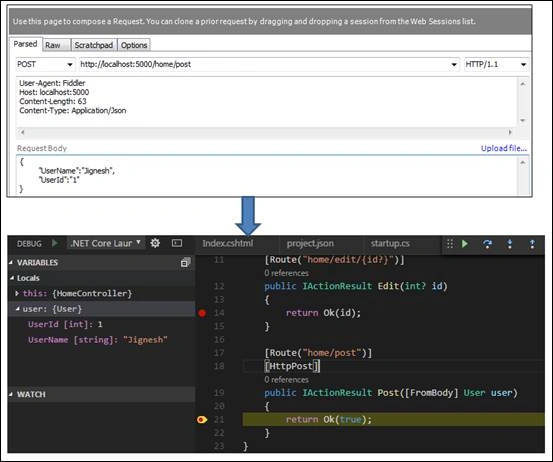
In the example, shown above we have talk about the simple type. If the action has parameter with non-primitive type such as class which may contains both types of properties: simple and complex, MVC model binding is able to handle the things. MVC model binding looks for the pattern "parametername.propertyname" to bind the values. If model binding doesn’t find any matching for the said pattern, it looks for using property name. For the collection type, it looks for the parameter_name[index] or only [index] and treats as a Dictionary types.
For the complex type parameter, class must have a public default constructor and properties used for binding must have public settable properties. Model binding uses only public default constructor for class initialization.
Model binding uses reflection and recursion to traverse the properties of the complex types for the property matches. Once Model binding binds any value with the property, it stops looking for the value with that name and move on the next parameter. MVC doesn’t throw any error, when binding fails.
Handle the behavior of Model binding using attribute
There are many attributes contained by MVC, which help us control the behavior of the Model binding. For example, “BindNever” attribute is used to tell Model binding, which does not bind any value to this parameter.
Following is the list of attributes supported by the Model binding-
- BindNever
This attribute tells to the Model binder to not to bind the value with the parameter. - BindRequired
This attribute tells the Model binder that binding is required. If binding is not found, this attribute adds the error to the model state. - FromHeader
This attributes defines the binding source that is request header. - FromQuery
This attribute tells to Model binder to search the binding value from the query string. - FromRoute
This attribute tells to Model binder to search the binding value from the route. - FromForm
This attribute tells to Model binder to search the binding value from the form. - FromServices
This attribute uses DI (Dependency Injection) to bind the parameters from the Services. - FromBody
This attribute tells to Model binder to search the binding value from request body. It uses configured formatter to bind the value from the body and formatter is defined in the content type of the request. - ModelBinder
This tells to Model binding, which uses custom model binder to bind the parameters.
Manav PandyaPosted Oct 6, 2016, 5:51 AM
Nice post ...
Bhavik PatelPosted Oct 6, 2016, 1:13 AM
Nice
Vignesh ManiPosted Oct 5, 2016, 4:49 AM
Nice One
Manoj KulkarniPosted Oct 5, 2016, 1:01 AM
Nice article. Thank you for sharing